|
|
| (One intermediate revision by the same user not shown) |
| Line 82: |
Line 82: |
|
| |
|
| See more details here [[Regbot firmware]]. | | See more details here [[Regbot firmware]]. |
|
| |
| === Intel Librealsense ===
| |
|
| |
| Installing support for Intel librealsense.
| |
|
| |
| sudo apt install libssl-dev
| |
| sudo apt-get install freeglut3-dev
| |
| sudo apt-get install xorg-dev
| |
| cd git
| |
| git clone https://github.com/IntelRealSense/librealsense.git
| |
| cd librealsense
| |
| mkdir build
| |
| cd build
| |
| cmake ..
| |
|
| |
| I also needed to install libusb-1.0-0-dev
| |
| sudo apt install libusb-1.0-0-dev
| |
| This path was not included in the CMakeLists.txt, so I added this line at the beginning of the CMakeLists.txt:
| |
|
| |
| cd librealsense
| |
| nano CMakeLists.txt
| |
| add
| |
| include_directories( /usr/include/libusb-1.0/ )
| |
| like here:
| |
| cmake_minimum_required(VERSION 3.10)
| |
|
| |
| set( LRS_TARGET realsense2 )
| |
| project( ${LRS_TARGET} LANGUAGES CXX C )
| |
|
| |
| # Allow librealsense2 and all of the nested project to include the main repo folder
| |
| set(REPO_ROOT ${CMAKE_CURRENT_SOURCE_DIR})
| |
| include_directories(${REPO_ROOT})
| |
| '''include_directories( /usr/include/libusb-1.0/ )'''
| |
|
| |
| include(CMake/lrs_options.cmake)
| |
| include(CMake/connectivity_check.cmake)
| |
| ...
| |
|
| |
| == ROS2 ==
| |
|
| |
| From https://docs.ros.org/en/jazzy/Installation/Ubuntu-Install-Debs.html
| |
|
| |
| Install
| |
| export ROS_APT_SOURCE_VERSION=$(curl -s https://api.github.com/repos/ros-infrastructure/ros-apt-source/releases/latest | grep -F "tag_name" | awk -F\" '{print $4}')
| |
|
| |
| curl -L -o /tmp/ros2-apt-source.deb "https://github.com/ros-infrastructure/ros-apt-source/releases/download/${ROS_APT_SOURCE_VERSION}/ros2-apt-source_${ROS_APT_SOURCE_VERSION}.$(. /etc/os-release && echo ${UBUNTU_CODENAME:-${VERSION_CODENAME}})_all.deb"
| |
|
| |
| sudo dpkg -i /tmp/ros2-apt-source.deb
| |
|
| |
| sudo apt update && sudo apt install ros-dev-tools
| |
|
| |
| Install full ROS2 Jazzy
| |
|
| |
| sudo apt install ros-jazzy-desktop
| |
|
| |
| Start in this ROS2 environment, now and in new terminals:
| |
| source /opt/ros/jazzy/setup.bash
| |
| echo "source /opt/ros/jazzy/setup.bash" >> ~/.bashrc
| |
| export ROS_DOMAIN_ID=0
| |
| echo "export ROS_DOMAIN_ID=0" >> ~/.bashrc
| |
|
| |
| Install ROS QT GUI stuff
| |
| sudo apt install '~nros-jazzy-rqt*'
| |
|
| |
| === Create workspace ===
| |
|
| |
| From https://docs.ros.org/en/jazzy/Tutorials/Beginner-Client-Libraries/Colcon-Tutorial.html
| |
|
| |
| Install colcon
| |
| sudo apt install python3-colcon-common-extensions
| |
|
| |
| Create workspace directory
| |
| mkdir -p ~/ros2_ws/src
| |
| cd ~/ros2_ws
| |
|
| |
| From within this directory clone (any) standard package
| |
|
| |
| e.g. tutorial examples
| |
| git clone https://github.com/ros2/examples src/examples -b jazzy
| |
|
| |
| Build the examples; this is memory and CPU-hungry, so the option ''--executor sequential'' may come in handy, especially on a Raspberry Pi, but it will take significantly longer.
| |
| colcon build --symlink-install --executor sequential
| |
|
| |
| Allow use of colcon_cd
| |
| echo "source /usr/share/colcon_cd/function/colcon_cd.sh" >> ~/.bashrc
| |
| echo "export _colcon_cd_root=/opt/ros/jazzy/" >> ~/.bashrc
| |
|
| |
| To use the ''mixin'' shortcut for some colcon options, add:
| |
| colcon mixin add default https://raw.githubusercontent.com/colcon/colcon-mixin-repository/master/index.yaml
| |
| colcon mixin update default
| |
|
| |
| === MQTT client ===
| |
|
| |
| The un-modified ''mqtt_client'' package can act as a bridge between the ''teensy_interface'' and the ROS domain.
| |
|
| |
| From MQTT to ROS, the translation is using the primitive ROS type ''string'' for the parameters of the ''teensy_interface'' messages.
| |
| The MQTT topic name is translated to ROS topic names as specified in the parameter file below.
| |
|
| |
| From ROS to Teensy, the message should be published on a topic that matches the desired destination.
| |
| Topics for command messages to the ''teensy_interface'':
| |
| * MQTT topic ricbot/cmd/T0 for the Teensy, the message is the string to send to the Teensy.
| |
| * MQTT topic ricbot/cmd/shutdown to schedule a shutdown of the RICBOT (power off), something like 20 seconds after the message.
| |
| * MQTT topic ricbot/cmd/ti for messages to the teensy_interface, the message is a string.
| |
|
| |
| ==== Install ====
| |
|
| |
| The robot's interface is via MQTT. Install the MQTT ROS client
| |
| sudo apt install ros-jazzy-mqtt-client
| |
|
| |
| Or directly as source
| |
| cd src
| |
| git clone https://github.com/ika-rwth-aachen/mqtt_client
| |
|
| |
| Compile:
| |
| cd ~/ros2_ws
| |
| colcon build
| |
|
| |
| ==== Run MQTT_client ====
| |
|
| |
| To start the ''mqtt_client'':
| |
| cd ros2_ws/src/mqtt_client/mqtt_client/config
| |
| ros2 launch mqtt_client standalone.launch.xml params_file:="params.teensy.yaml"
| |
| The parameter file should be extended with more ''mqtt2ros'' topics as needed.
| |
|
| |
| This will launch the un-modified ''mqtt_client'' node with specific bridge parameters as specified in ''params.teensy.yaml'':
| |
| /**/*:
| |
| ros__parameters:
| |
| broker:
| |
| host: localhost
| |
| port: 1883
| |
| tls:
| |
| enabled: false
| |
| client:
| |
| id: ros
| |
| clean_session: true
| |
| keep_alive_interval: 20.0
| |
| bridge:
| |
| ros2mqtt:
| |
| ros_topics:
| |
| - /teensy/cmd/T0
| |
| - /teensy/cmd/shutdown
| |
| - /teensy/cmd/ti
| |
| /teensy/cmd/T0:
| |
| mqtt_topic: ricbot/cmd/T0
| |
| primitive: true
| |
| inject_timestamp: false
| |
| /teensy/cmd/shutdown:
| |
| mqtt_topic: ricbot/cmd/shutdown
| |
| primitive: true
| |
| inject_timestamp: false
| |
| /teensy/cmd/ti:
| |
| mqtt_topic: ricbot/cmd/ti
| |
| primitive: true
| |
| inject_timestamp: false
| |
| mqtt2ros:
| |
| # Needs to be expanded to relevant topics
| |
| mqtt_topics:
| |
| - ricbot/data/T0/info
| |
| - ricbot/data/T0/hbt
| |
| ricbot/data/T0/info:
| |
| ros_topic: /teensy/T0/info
| |
| primitive: true
| |
| ricbot/data/T0/hbt:
| |
| ros_topic: /teensy/T0/hbt
| |
| primitive: true
| |
|
| |
| === Test interface ===
| |
|
| |
| Start the ''teensy_interface'' with the right ini-file:
| |
| cd ~/svn/robobot/teensy_interface/build
| |
| ./teensy_interface -z ricbot.ini
| |
|
| |
| This should respond with something like:
| |
| $ ./teensy_interface -z ricbot.ini
| |
| # UService:: created directory log_20260118_083120.745/
| |
| # UMqtt:: connection to MQTT broker on tcp://localhost:1883 established
| |
| # UMqttIn:: connection to MQTT broker on tcp://localhost:1883 established
| |
| # STeensy:: opening to USB /dev/ttyACM0
| |
| # SRobot:: (t0) found IP 0: eno1 192.168.2.157
| |
| # STeensy:: just connected
| |
| # UService:: setup of Teensy 0 modules finished OK.
| |
| # Type quit to stop, or 'h' for help
| |
|
| |
| Start the ''mqtt_client'' in ROS
| |
| cd ~/svn/ricbot/ros_config
| |
| ros2 launch mqtt_client standalone.launch.xml params_file:="params.teensy.yaml"
| |
|
| |
| ==== From MQTT to ROS ====
| |
|
| |
| There should now be ''hbt'' (heartbeat) message on the ROS side:
| |
| ros2 topic echo /teensy/T0/hbt
| |
|
| |
| This should give something like:
| |
| data: '1768722645.7425 1738.4885 93 1748 4.85 0 9 18.1 0 0
| |
| '
| |
| ---
| |
| data: '1768722646.2426 1738.9885 93 1748 4.85 0 9 18.0 0 0
| |
| '
| |
| ---
| |
| data: '1768722646.7431 1739.4885 93 1748 4.85 0 9 18.0 0 0
| |
| '
| |
| ---
| |
|
| |
| The data is: timestamp (host), timestamp Teensy, Teensy ID, version, battery voltage, ... (the rest depend on the platform).
| |
|
| |
| ==== From ROS to MQTT ====
| |
|
| |
| e.g. make the robot drive with velocity 0.25m/s and turn 0.1 rad/s CCV, followed by stop:
| |
|
| |
| ros2 topic pub /ricbot/cmd/ti std_msgs/String 'data: rc 0.25 0.1'
| |
| ros2 topic pub /ricbot/cmd/ti std_msgs/String 'data: rc 0 0'
| |
|
| |
| Or send a request to publish gyro data every 12ms:
| |
|
| |
| ros2 topic pub /ricbot/cmd/T0 std_msgs/String 'data: sub gyro 12'
| |
|
| |
| == (RIC_pkg) HW sensor translate package ==
| |
|
| |
| Create the package in the workspace.
| |
|
| |
| cd ~/ros2_ws/src
| |
| ros2 pkg create --build-type ament_cmake --license MIT --node-name ric_node ric_pkg
| |
|
| |
| Add dependencies to other packages to CMakeLists.txt.
| |
| Add to the list of ''find_package''
| |
|
| |
| find_package(rclcpp REQUIRED)
| |
| find_package(std_msgs REQUIRED)
| |
| find_package(nav_msgs REQUIRED)
| |
| find_package(sensor_msgs REQUIRED)
| |
| find_package(geometry_msgs REQUIRED)
| |
|
| |
| Make target dependencies available in the include path (and elsewhere as needed).
| |
|
| |
| Add this after the ''add_executable''
| |
| ament_target_dependencies(talker rclcpp std_msgs nav_msgs sensor_msgs geometry_msgs)
| |
|
| |
| To the package description ''package.xml'' add dependencies:
| |
|
| |
| Add just after the ''buildtool_depend'' section:
| |
| <depend>rclcpp</depend>
| |
| <depend>std_msgs</depend>
| |
| <depend>nav_msgs</depend>
| |
| <depend>sensor_msgs</depend>
| |
| <depend>geometry_msgs</depend>
| |
|
| |
| === RIC_node code ===
| |
|
| |
| The code in ''ris_node.cpp'' is pt this (not functional yet):
| |
|
| |
| #include <cstdio>
| |
| #include <chrono>
| |
| #include <memory>
| |
| #include <string>
| |
|
| |
| #include "rclcpp/rclcpp.hpp"
| |
| #include "std_msgs/msg/string.hpp"
| |
| #include "std_msgs/msg/int32.hpp"
| |
| #include <nav_msgs/msg/odometry.hpp>
| |
| #include "geometry_msgs/msg/twist.hpp"
| |
|
| |
| class RIC_translator : public rclcpp::Node
| |
| {
| |
| public:
| |
| RIC_translator()
| |
| : Node("minimal_publisher"), count(0)
| |
| {
| |
| publisher_ = this->create_publisher<std_msgs::msg::String>("/ric/hbt", 10);
| |
| //
| |
| // Heartbeat
| |
| auto topic_callback =
| |
| [this](std_msgs::msg::String::UniquePtr msg) -> void {
| |
| // RCLCPP_INFO(this->get_logger(), "I heard: hbt '%s'", msg->data.c_str());
| |
| // strncpy(hbtParams, msg->data.c_str(), 100);
| |
| printHbt(msg->data.c_str());
| |
| };
| |
| subsHbt =
| |
| this->create_subscription<std_msgs::msg::String>("/teensy/T0/hbt", 10, topic_callback);
| |
| }
| |
| private:
| |
| rclcpp::TimerBase::SharedPtr timer_;
| |
| rclcpp::Publisher<std_msgs::msg::String>::SharedPtr publisher_;
| |
| rclcpp::Publisher<std_msgs::msg::Int32>::SharedPtr odo_;
| |
| size_t count;
| |
| //
| |
| char hbtParams[100] = "";
| |
| rclcpp::Subscription<std_msgs::msg::String>::SharedPtr subsHbt;
| |
| void printHbt(const char * msg)
| |
| {
| |
| printf("# %lu got hbt %s", count, msg);
| |
| snprintf(hbtParams, 100, "Hello RIC %lu %s", count++, msg);
| |
| auto message = std_msgs::msg::String();
| |
| message.set__data(hbtParams);
| |
| this->publisher_->publish(message);
| |
| }
| |
| };
| |
|
| |
| int main(int argc, char ** argv)
| |
| {
| |
| rclcpp::init(argc, argv);
| |
| rclcpp::spin(std::make_shared<RIC_translator>());
| |
| rclcpp::shutdown();
| |
| return 0;
| |
| }
| |
|
| |
| === Run RIC_node ===
| |
|
| |
| Compile (from workspace)
| |
| colcon build --packages-select ric_pkg
| |
|
| |
| Then add it to the path
| |
| source install/setup.bash
| |
|
| |
| and run
| |
| ros2 run ric_pkg ric_node
| |
|
| |
| If the ''teensy_interface'' and the ''mqtt-client'' are also running, then (with the code above), it should print something like this on the console.
| |
| # 0 got hbt 1769340959.8623 13504.9463 105 1033 15.65 4 8 8.9 0.27 0
| |
| # 1 got hbt 1769340960.3625 13505.4463 105 1033 15.65 4 8 8.8 0.28 0
| |
| # 2 got hbt 1769340960.8626 13505.9453 105 1033 15.65 4 8 8.8 0.27 0
| |
| # 3 got hbt 1769340961.3622 13506.4463 105 1033 15.65 4 8 8.9 0.28 0
| |
| # 4 got hbt 1769340961.8625 13506.9463 105 1033 15.65 4 8 8.9 0.25 0
| |
| # 5 got hbt 1769340962.3631 13507.4453 105 1033 15.66 4 8 8.9 0.26 0
| |
| # 6 got hbt 1769340962.8624 13507.9463 105 1033 15.63 4 8 8.8 0.26 0
| |
|
| |
| === Ros2 relevant messages ===
| |
|
| |
| One of the messages are probably ''twist'':
| |
| ros2 interface show geometry_msgs/msg/Twist
| |
| # This expresses velocity in free space broken into its linear and angular parts.
| |
| Vector3 linear
| |
| float64 x
| |
| float64 y
| |
| float64 z
| |
| Vector3 angular
| |
| float64 x
| |
| float64 y
| |
| float64 z
| |
|
| |
| === Where from here ===
| |
|
| |
| Search for tutorials in https://docs.ros.org/en/jazzy/
| |
Back to Ricbot
Hardware
Tentative layout:

Length is 1m, free height 25cm, width 65cm.
Installation notes
Camera position
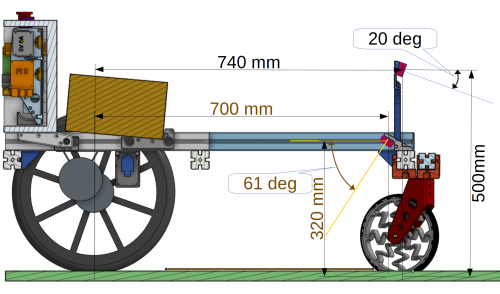
Forward-looking camera: Intel RealSense D455, FOV 87 x 58 deg, range 0.6 to 6m.
Down-looking camera: Intel RealSense D435, FOV: 87 x 58 deg, range 0.3 to 3m.
Cabling
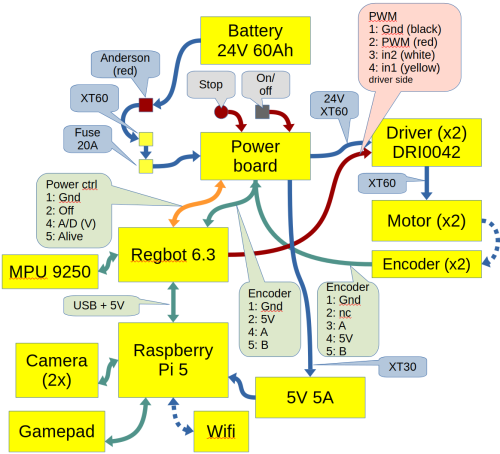
DRI0042: https://wiki.dfrobot.com/15A_Single_DC_Motor_Driver_SKU__DRI0042
Regbot 6.3: Regbot hardware board
RICBOT Power on-off board PCB
DRI0042 to Regbot 4-pin PWM
DRI              Regbot PWM    Software
7 GND   (black)  1 GND         --
4 PWM   (red)    2 in1         PIN_xxxx_DIR
5 IN1   (white)  3 in2         PIN_xxxx_PWM
6 IN2   (yellow) 4 fault       PIN_xxxx_FAULT
3 5V out
DRI0042 control values
IN1 	IN2 	PWM 	OUT1, OUT2 Motor Behavior
0 	0 	x 	Stop
1 	1 	x 	Vacant (relax)
1 	0 	1 	Forward 100%
0 	1 	1 	Reverse 100%
1 	0 	PWM 	Forward at PWM speed
0 	1 	PWM 	Reverse at PWM speed
Power control
Pin        IDC10-pin      Software       Function
1 (black)  1              --             GND
2 (red)    3              LS_1  (pin 27) power off (when low)  -- pt not working (wrong mod on power board)
3 (white)  4              LS_0  (A6)     battery voltage  (39k/4.7k)
4 (yellow) 6              LS_4  (pin 26) Alive LED
Teensy interface
The Teensy interface implements a bridge to MQTT, a motor controller (velocity and turn rate), and a remote control.
The configuration is in
/home/local/svn/teensy_interface/build/robot.ini
See also Robobot teensy interface.
Start at boot
See the similar start setup in [[1]].
Comment out (or delete) the start of the camera streamer (not compatible with RealSense 3D cam)
Install software on Raspberry Pi
Perform the same installation as Robobot install on Raspberry, except for the serial port configuration (which should not be needed).
Teensy software
This is the Regbot software, configured to match the Ricbot.
See more details here Regbot firmware.


